Arduino
My beginner-friendly guide to Arduino. What it is, how it works and why it sparked my love for electronics.
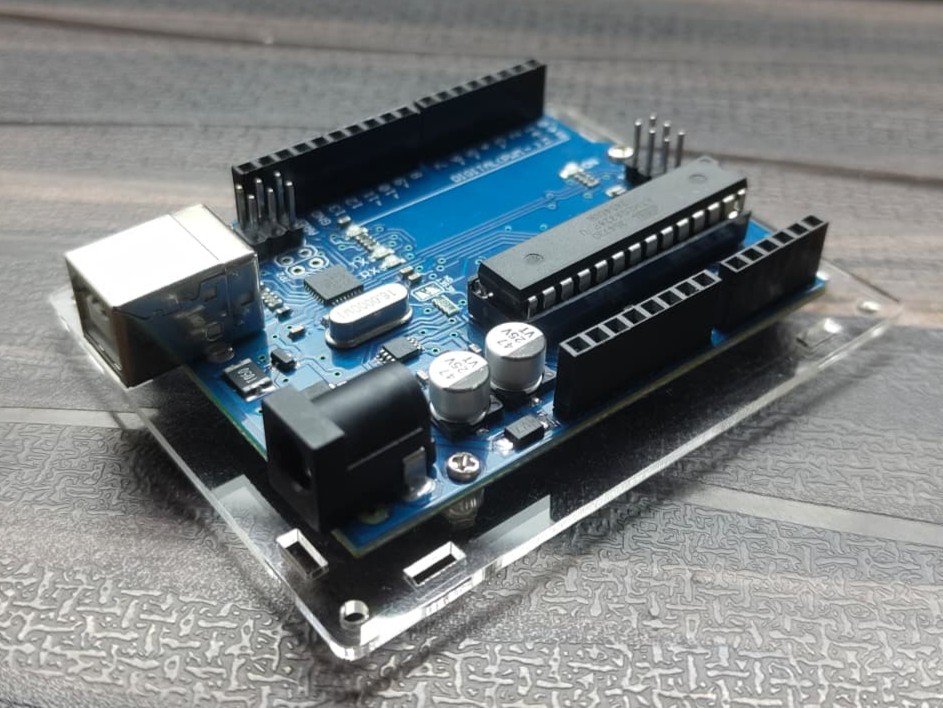
Arduino - My Gateway to electronics
When I first picked up an Arduino, I honestly had no clue what I was doing. It was just this small blue board with a bunch of holes (pins), a USB port, and a chip sitting in the middle. But once I plugged it in and uploaded my first program, I realized how powerful this little thing really is.
So, what is an Arduino?
It’s basically a microcontroller development board that lets you control electronic components using code. You can make LEDs blink, motors spin, sensors react and even connect it to the internet, all with a few lines of C/C++ code. Which is open source, you’ll get to know the significance later.
 Open source
MPU or MCU ?
A microcontroller and a microprocessor might sound similar, but they’re built for very different purposes. Both are the “brains” of electronic systems, but the environments they work in and what they control are not the same.
A Microcontroller (MCU) is a compact, all-in-one system designed to handle specific, dedicated tasks. It has a CPU, memory (RAM, Flash, EEPROM), and input/output ports all integrated into a single chip. This makes it perfect for controlling devices directly — like reading sensors, turning on motors, or blinking LEDs. It doesn’t need an external operating system or additional chips to function. You just upload your code, and it runs immediately when powered on.
 ATmega Micro-controllers
In contrast, a Microprocessor (MPU) is built for complex and general-purpose computing. It contains only the CPU, meaning it needs external components like RAM, storage, and input/output controllers to work. You’ll find microprocessors inside computers, laptops, and smartphones, basically anything that runs an operating system like Windows, Linux or Android. They’re designed to handle multiple tasks at once and process large amounts of data.
 64-bit, 32-core (64-threads), AMD Ryzen Threadripper 7970X based on x86-64 Zen 4 (2023)
Not like you guys needed a difference between these two, but this used to bug me a lot when I started out as a beginner (sometimes it still does).
ATmega328P
At the heart of the Arduino Uno R3, there’s a chip called the ATmega328P. Think of this as a brain, where the code lives and runs. This particular micro-controller has:
- 32 KB of Flash memory (where your code is stored)
- 2 KB of SRAM (for variables when your program runs)
- 1 KB of EEPROM (for saving data even after power off)
- It runs at 16 MHz, which is pretty fast for what it does.
But not as fast and powerful as an ESP.
The Arduino Uno R3
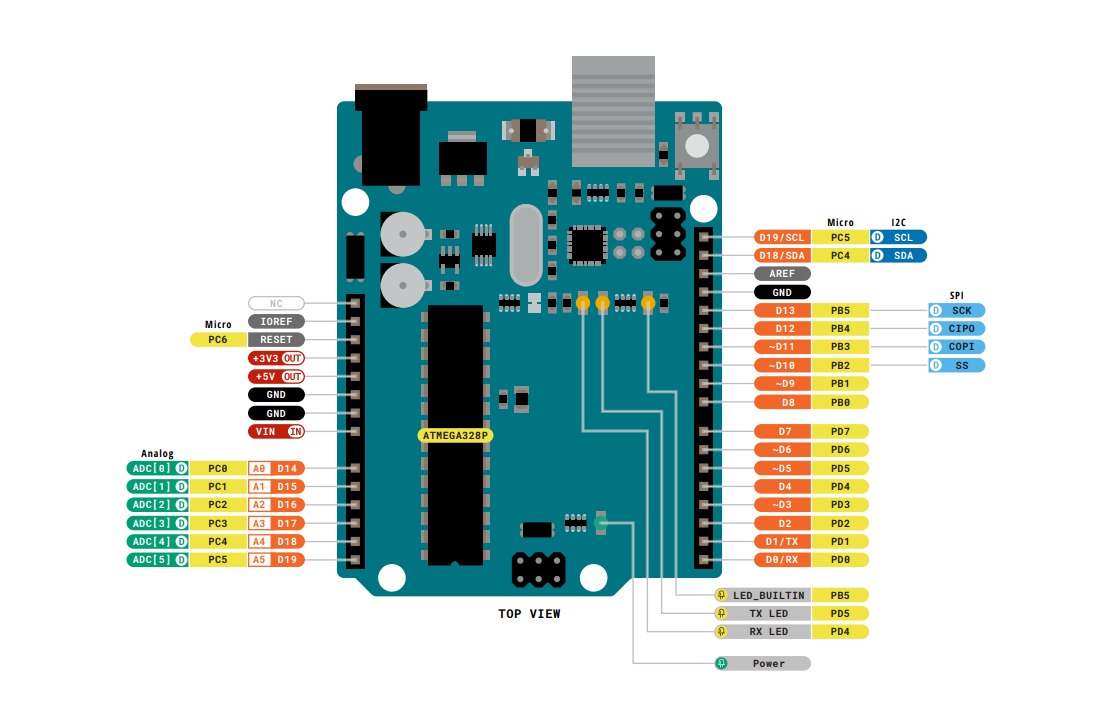
The Uno R3 is the most popular Arduino board out there. It’s the one I (and almost everyone) started with. It has a USB Type-B port to connect to your computer, and you power it either through USB or a 9V adapter.
Here’s what you’ll find on it:
14 Digital I/O Pins (0–13) → Can be used as input or output. Pins 0 and 1 are special — they’re used for serial communication (TX/RX).
6 Analog Input Pins (A0–A5) → Used for reading sensor values like temperature, light, etc. (anything that gives variable voltage).
PWM Pins (3, 5, 6, 9, 10, 11) → These can mimic analog output — useful for controlling LED brightness or motor speed.
Power Pins → 3.3V, 5V, GND, and Vin. These are your main voltage sources for the circuit.
Reset Button → Restarts the code from the beginning. Handy when things go weird.
Getting Started
If you’re curious and want to start your journey, Here’s where I started:
- Visit Official Arduino site.
- Visit Robonyx Academy (Start from here)
- Books I recommend:
If you want to know more about the Arduino Check this out!
Well these are also my source for this blog, and also wikipedia.